
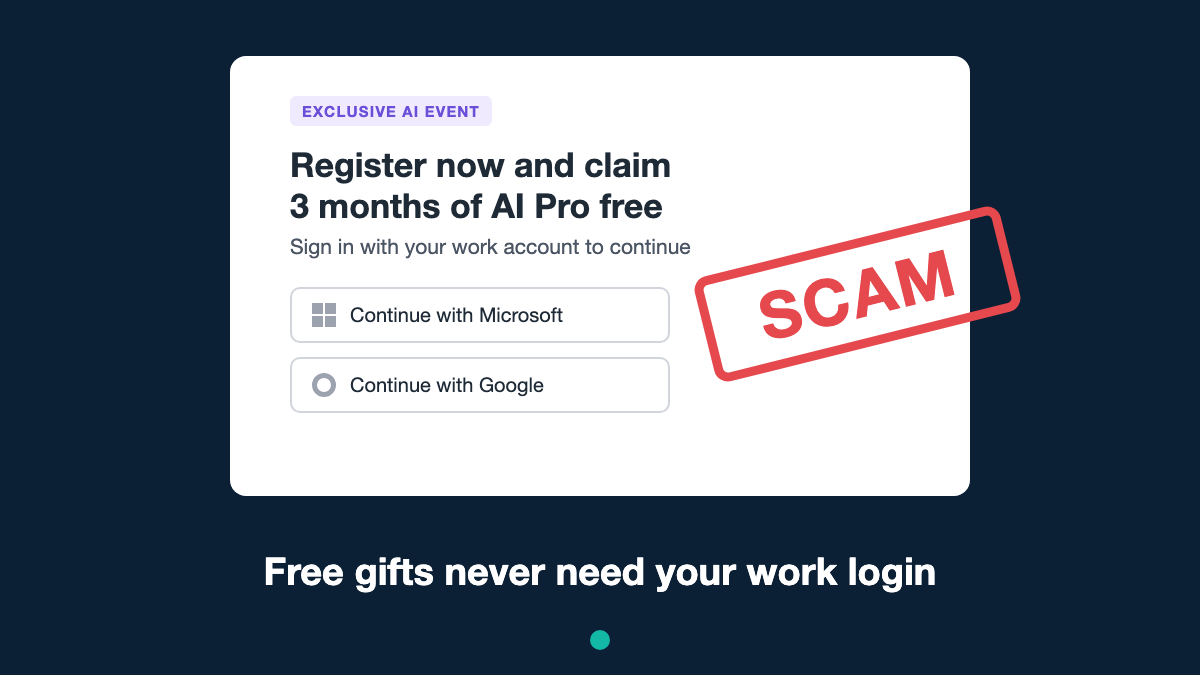
An invitation lands in your inbox: an exclusive online event from OpenAI, SpaceX or Anthropic. Sign up with your work account and you’ll get three months of a premium AI tool for free. It sounds like a nice perk. It’s actually a trap built to take over your work Microsoft or Google account, and it works even if you use two-step verification.
What’s going on
Researchers at security company Push Security spotted the campaign in late October 2026, and it was reported by BleepingComputer. Criminals are creating convincing fake event pages that borrow the names of big AI and tech companies. Examples include:
- An OpenAI session about ChatGPT for marketing teams, offering three months of ChatGPT Pro
- A “private” SpaceX event, offering a free AI subscription or even a “SpaceX share”
- An Anthropic event linked to a well-known tech conference (since taken down)
None of these events are real, and none of these companies are involved.
How the trick works
- You click a link in an invite. It passes through a few short links before landing on the fake page, which makes it harder for security tools to follow.
- You’re shown a normal-looking “Confirm you’re not a robot” check. This makes the page feel legitimate, but it’s really there to block security scanners.
- The registration page tells you to sign in with your work account to claim your reward, with buttons for Microsoft and Google.
What happens next depends on which button you press.
If you choose Microsoft: the “enter this code” trick
The page gives you a short code and sends you to a genuine Microsoft website to type it in. Because the Microsoft page is real, everything looks fine. You enter the code, approve the sign-in on your phone as usual, and carry on.
But that code wasn’t for you. It belonged to the criminals. By typing it in and approving it, you’ve effectively said to Microsoft: “Yes, let this device into my account.” The criminals now have access to your email, files and possibly other work apps you sign into with the same account, without ever needing your password. You’ll then be shown a fake Microsoft login page that tries to grab your password too.
If you choose Google: the see-through fake
A pop-up shows what looks exactly like Google’s sign-in page. Behind the scenes, it’s passing everything you type to the real Google while recording it. That includes your password, the code from your phone, and the “you’re logged in” token Google gives back. With that token, the criminals can walk straight into your account as if they were you.
Why two-step verification didn’t stop it
Two-step verification is still one of the best things you can do. But in both tricks, you do the verifying for the criminals. You approve the request yourself, on a real or perfectly copied page, so the extra security step just waves them through.
The rules to remember
Never type a sign-in code that a website gave you into a Microsoft page, unless you started the sign-in yourself on a device you own, such as a smart TV or a new laptop.
Be suspicious of any “free gift” that needs your work login. Genuine companies don’t give away premium subscriptions in exchange for signing in to an event page.
How to stay safe
- Check invitations at the source. If an event sounds interesting, go to the company’s official website yourself rather than clicking the link.
- Don’t trust a page just because it looks professional or has a “not a robot” check. Criminals use both.
- Stop if you get a sign-in prompt you didn’t expect. If your phone asks you to approve a login you didn’t start, deny it.
- Use a passkey or security key if your employer offers one. These are much harder to trick than codes and push notifications.
Think you’ve fallen for it?
- Tell your IT or security team straight away. They can sign you out everywhere and cut off the criminals’ access. Don’t worry about being embarrassed. Speed matters far more.
- Change your work password once IT tells you to.
- Watch for odd activity, such as emails you didn’t send or new inbox rules.
- Report the email. In the UK you can forward suspicious emails to the NCSC at [email protected]. If you’ve lost money, report it to Action Fraud at actionfraud.police.uk or on 0300 123 2040. In Scotland, call Police Scotland on 101.
For IT teams: the short version
Push Security links the campaign to two phishing-as-a-service platforms. Kali365 handles Microsoft device code phishing, abusing the OAuth 2.0 device authorisation grant to get Entra ID tokens. VoidProxy handles adversary-in-the-middle phishing of Google accounts, and of Microsoft accounts as a second stage. Lures are delivered through Google and Zapier redirectors behind Cloudflare Turnstile, and earlier waves abused GoTo Webinar and real Zoom event pages. Recommended steps:
- Block the device code flow with Conditional Access (Authentication flows) for every user who doesn’t need it.
- Roll out phishing-resistant MFA (FIDO2 keys or passkeys) and enforce it through authentication strengths.
- Hunt Entra sign-in logs for device code authentications (authentication protocol “deviceCode”) from unusual locations, and for token use from unfamiliar IPs.
- Brief staff on this specific lure: AI-branded event invites offering free subscriptions in exchange for a work login.
If something offers you a free gift in return for your work login, treat it as a scam until proven otherwise. A quick check with your IT team costs nothing.
Leave a Reply